<?xml version="1.0" encoding="UTF-8" ?>
<feed xml:lang="ja" xmlns="http://www.w3.org/2005/Atom" xmlns:dc="http://purl.org/dc/elements/1.1/" xmlns:thr="http://purl.org/syndication/thread/1.0">
  <title type="text">覚書。 by kukuri</title>
  <subtitle type="html">CGの個人メモ帳。
ごくごく個人的なメモなのであしからず。</subtitle>
  <link rel="self" type="application/atom+xml" href="http://samocg.blog.shinobi.jp/atom"/>
  <link rel="alternate" type="text/html" href="http://samocg.blog.shinobi.jp/"/>
  <updated>2008-04-21T01:29:27+09:00</updated>
  <author><name>No Name Ninja</name></author>
  <generator uri="//www.ninja.co.jp/blog/" version="0.9">忍者ブログ</generator>
  <atom10:link xmlns:atom10="http://www.w3.org/2005/Atom" rel="hub" href="http://pubsubhubbub.appspot.com/" />
  <entry>
    <id>samocg.blog.shinobi.jp://entry/41</id>
    <link rel="alternate" type="text/html" href="http://samocg.blog.shinobi.jp/modo/%E9%AB%AA%E3%81%AE%E6%AF%9B%EF%BC%88%E3%83%98%E3%82%A2%E3%83%BC%E3%82%AC%E3%82%A4%E3%83%89%E3%81%A7%EF%BC%89" />
    <published>2011-07-26T10:20:19+09:00</published> 
    <updated>2011-07-26T10:20:19+09:00</updated> 
    <category term="modo" label="modo" />
    <title>髪の毛（ヘアーガイドで）</title>
    <content mode="escaped" type="text/html" xml:lang="utf-8"> 
      <![CDATA[<br />
<br />
<img alt="fb92f6da.png" border="0" align="left" src="//samocg.blog.shinobi.jp/Img/1311636826/" />&nbsp;<br />
<br />
<br />
<br />
<br />
<br />
<br />
<br />
<br />
<br />
<br />
<br />
<img alt="b71835ca.png" border="0" align="left" src="//samocg.blog.shinobi.jp/Img/1311642800/" /><br />
<br />
<br />
<br />
<br />
<br />
<br />
<br />
<br />
<br />
<br />
<br />
<br />
<img alt="a0e2a3c5.png" border="0" align="left" src="//samocg.blog.shinobi.jp/Img/1311643382/" /><br />
<br />
<br />
<br />
<br />
<br />
<br />
<br />
<br />
<br />
<br />
<br />
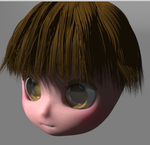
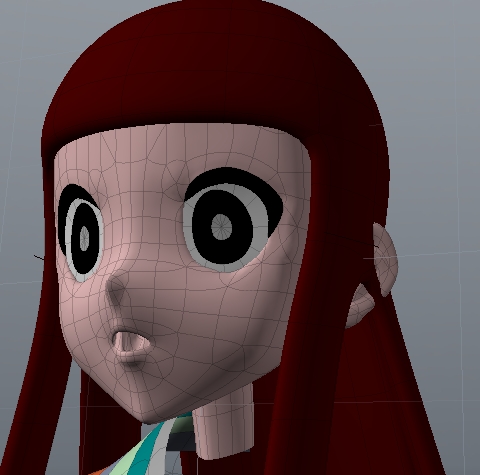
<font color="#FF0000">はやしたい部分を複製してマテリアル設定する</font><br />
（前髪、横、後ろ）<br />
<br />
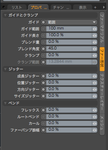
<font color="#FF0000">スカルプトからヘアーガイドツールをクリックしてガイドの設定をする</font><br />
<br />
ベンドを設定すると髪の毛が下に落ちる<br />
セグメント数をやたらと増やすべきではないと書いてあったが<br />
ある程度の数値にしないとデフォルト値のままでは、髪の毛が広がってボサボサな感じになる<br />
（ガイドにあまり従ってくれない）<br />
ガイド数は、選択した頂点の数に合わせるとよいが、増えるとコントロールが＾＾；<br />
頂点数を調べるにはAlt＋頂点で<br />
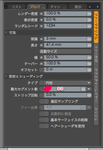
<font color="#FF0000">設定したマテリアルにファーマテリアルのレイヤーを追加する<br />
<br />
</font>シェーダーツリーのファー設定は、基本０％にしておかないと、ガイドに従わない<br />
<br />
ヘアーツールは、撫で付けるには櫛、毛の長さはストレッチで<br />
ストレッチは、マイナス数値で伸びて、プラス数値で短くなる<br />
<br type="_moz" />]]> 
    </content>
    <author>
            <name>No Name Ninja</name>
        </author>
  </entry>
  <entry>
    <id>samocg.blog.shinobi.jp://entry/39</id>
    <link rel="alternate" type="text/html" href="http://samocg.blog.shinobi.jp/modo/%E7%9B%AE%E3%81%ABhdi%E3%82%92%E6%98%A0%E3%81%97%E8%BE%BC%E3%82%80" />
    <published>2011-07-24T22:52:46+09:00</published> 
    <updated>2011-07-24T22:52:46+09:00</updated> 
    <category term="modo" label="modo" />
    <title>目にHDIを映し込む</title>
    <content mode="escaped" type="text/html" xml:lang="utf-8"> 
      <![CDATA[&nbsp;プリセットのE を呼び出し、選択する。<br />
選択したものを画面にドラックする。<br />
<br />
シェーダーツリーのE を選択し、カメラを可視のチェックを外すと、目にだけ映り込む<br />
（他の可視チェック項目については、調べてない）]]> 
    </content>
    <author>
            <name>No Name Ninja</name>
        </author>
  </entry>
  <entry>
    <id>samocg.blog.shinobi.jp://entry/38</id>
    <link rel="alternate" type="text/html" href="http://samocg.blog.shinobi.jp/modo/%E3%83%98%E3%82%A2%E3%83%BC%E3%82%AC%E3%82%A4%E3%83%89%E3%81%AE%E8%A8%AD%E5%AE%9A" />
    <published>2011-07-24T22:48:17+09:00</published> 
    <updated>2011-07-24T22:48:17+09:00</updated> 
    <category term="modo" label="modo" />
    <title>ヘアーガイドの設定</title>
    <content mode="escaped" type="text/html" xml:lang="utf-8"> 
      <![CDATA[&nbsp;髪の毛をはやす部分のポリゴンを複製する。<br />
<br />
前髪、横、後ろなど、マテリアルをわける。<br />
<br />
スカルプトのヘアーツールからヘアーガイドをクリック<br />
<br />
以下の設定をする<br />
<br />
<br />
ベンド量は、髪を撫で付けるつもりなら、最初から設定しておいた方がよいかも。<br />
<br />
は、髪の毛をはやしたい部分の頂点の数を調べ（もしくは、情報から）、その数値を入力。<br />
（少ないと、はえてこない箇所が出てくる）<br />
<br />
シェーダーツリーの髪の毛をはやしたいマテリアルに、ファーマテリアルのレイヤーを追加する。<br />
<br />
は、範囲にする。<br />
赤線の部分は、０にしておかないとファーがガイドに沿わないかも。<br />
<br />
あとは、ヘアーツールの移動、ストレッチなどで微調整する。<br />
ストレッチは、マイナス数値にして調整したい箇所をなぞると髪の毛が伸び、<br />
プラス数値にすると短くなる。]]> 
    </content>
    <author>
            <name>No Name Ninja</name>
        </author>
  </entry>
  <entry>
    <id>samocg.blog.shinobi.jp://entry/37</id>
    <link rel="alternate" type="text/html" href="http://samocg.blog.shinobi.jp/modo/%E9%A1%94%E3%81%AE%E5%8E%9F%E5%9E%8B%E3%81%AE%E4%BD%9C%E3%82%8A%E6%96%B9" />
    <published>2011-03-13T03:51:53+09:00</published> 
    <updated>2011-03-13T03:51:53+09:00</updated> 
    <category term="modo" label="modo" />
    <title>顔の原型の作り方</title>
    <content mode="escaped" type="text/html" xml:lang="utf-8"> 
      <![CDATA[今のところ、前と横の写真撮影をして、前面の顔の分割線を引いて。出来れば横も。<br />
で、modoのソリッドとスカルプトでだいたいの形を作る。<br />
それを背景にして、そこからペンツールで面貼りしていくのがいいかな。]]> 
    </content>
    <author>
            <name>No Name Ninja</name>
        </author>
  </entry>
  <entry>
    <id>samocg.blog.shinobi.jp://entry/36</id>
    <link rel="alternate" type="text/html" href="http://samocg.blog.shinobi.jp/%E3%82%A2%E3%83%8B%E3%83%A1%E3%83%BC%E3%82%B7%E3%83%A7%E3%83%B3/%E9%81%A0%E8%BF%91%E6%84%9F%E3%82%92%E5%87%BA%E3%81%97%E3%81%A6%E6%AD%A9%E3%81%8B%E3%81%9B%E3%82%8B%E3%81%AB%E3%81%AF_36" />
    <published>2011-01-29T23:37:38+09:00</published> 
    <updated>2011-01-29T23:37:38+09:00</updated> 
    <category term="アニメーション" label="アニメーション" />
    <title>遠近感を出して歩かせるには</title>
    <content mode="escaped" type="text/html" xml:lang="utf-8"> 
      <![CDATA[オブジェクトを拡大、縮小。<br />
<br />
３Ｄ表示にして確認。<br />
<br />
オブジェクトを移動させたあとに出来たキーポイントのところで、背景を移動させる。<br />
<br />
Comera modo switch クリックした状態で再生。<br />
<br />
このあたりを駆使すればオブジェクトが移動しているように、<br />
かつ移動するのに追従して背景も動くように見える・・・かな？<br />]]> 
    </content>
    <author>
            <name>No Name Ninja</name>
        </author>
  </entry>
  <entry>
    <id>samocg.blog.shinobi.jp://entry/35</id>
    <link rel="alternate" type="text/html" href="http://samocg.blog.shinobi.jp/%E3%82%A2%E3%83%8B%E3%83%A1%E3%83%BC%E3%82%B7%E3%83%A7%E3%83%B3/%E9%81%A0%E8%BF%91%E6%84%9F%E3%82%92%E5%87%BA%E3%81%97%E3%81%A6%E6%AD%A9%E3%81%8B%E3%81%9B%E3%82%8B%E3%81%AB%E3%81%AF" />
    <published>2011-01-29T23:36:34+09:00</published> 
    <updated>2011-01-29T23:36:34+09:00</updated> 
    <category term="アニメーション" label="アニメーション" />
    <title>遠近感を出して歩かせるには</title>
    <content mode="escaped" type="text/html" xml:lang="utf-8"> 
      <![CDATA[オブジェクトを拡大、縮小。<br />
<br />
３Ｄ表示にして確認。<br />
<br />
オブジェクトを移動させたあとに出来たキーポイントのところで、背景を移動させる。<br />
<br />
Comera modo switch クリックした状態で再生。<br />
<br />
このあたりを駆使すればオブジェクトが移動しているように、<br />
かつ移動するのに追従して背景も動くように見える・・・かな？<br />]]> 
    </content>
    <author>
            <name>No Name Ninja</name>
        </author>
  </entry>
  <entry>
    <id>samocg.blog.shinobi.jp://entry/34</id>
    <link rel="alternate" type="text/html" href="http://samocg.blog.shinobi.jp/%E3%82%A2%E3%83%8B%E3%83%A1%E3%83%BC%E3%82%B7%E3%83%A7%E3%83%B3/%E3%82%BF%E3%82%A4%E3%83%A0%E3%82%AD%E3%83%BC%E3%81%AE%E9%96%93%E9%9A%94%E3%80%80%E6%AD%A9%E3%81%8F" />
    <published>2011-01-28T01:21:41+09:00</published> 
    <updated>2011-01-28T01:21:41+09:00</updated> 
    <category term="アニメーション" label="アニメーション" />
    <title>タイムキーの間隔　歩く</title>
    <content mode="escaped" type="text/html" xml:lang="utf-8"> 
      <![CDATA[<p>s wlakで普通？速度で歩くには<br />
<br />
キーポイント<br />
<br />
６６　１０８　１４５　２３３　ぐらいの間隔<br />
<br />
ソフト画面上で端から端まで、見えなくなるまで歩くには<br />
<br />
６６　１０８　でＯＫ</p>]]> 
    </content>
    <author>
            <name>No Name Ninja</name>
        </author>
  </entry>
  <entry>
    <id>samocg.blog.shinobi.jp://entry/33</id>
    <link rel="alternate" type="text/html" href="http://samocg.blog.shinobi.jp/modo/%E9%AB%AA%E3%81%AE%E6%AF%9B%E3%81%AE%E5%8E%9A%E3%81%BF" />
    <published>2011-01-15T23:12:22+09:00</published> 
    <updated>2011-01-15T23:12:22+09:00</updated> 
    <category term="modo" label="modo" />
    <title>髪の毛の厚み</title>
    <content mode="escaped" type="text/html" xml:lang="utf-8"> 
      <![CDATA[ポリゴンの先端をエッジ選択して、複製&rarr;曲線で押し出し<br />
<br />
で、大雑把に髪形を作る<br />
<br />
ポリゴン選択で、厚みをつける<br />
<br />
<img alt="" src="//samocg.blog.shinobi.jp/File/WS000042.JPG" /><br />
<br />
<img style="width: 262px; height: 259px" alt="" src="//samocg.blog.shinobi.jp/File/WS000041.JPG" /><br />
<br />
<br />
<br />
<br />]]> 
    </content>
    <author>
            <name>No Name Ninja</name>
        </author>
  </entry>
  <entry>
    <id>samocg.blog.shinobi.jp://entry/32</id>
    <link rel="alternate" type="text/html" href="http://samocg.blog.shinobi.jp/modo/%E3%82%AA%E3%83%96%E3%82%B8%E3%82%A7%E3%82%AF%E3%83%88%E3%82%92%E5%9C%B0%E9%9D%A2%E3%81%AB%E7%AB%8B%E3%81%9F%E3%81%9B%E3%82%8B%E3%81%AB%E3%81%AF" />
    <published>2009-02-01T08:41:23+09:00</published> 
    <updated>2009-02-01T08:41:23+09:00</updated> 
    <category term="modo" label="modo" />
    <title>オブジェクトを地面に立たせるには</title>
    <content mode="escaped" type="text/html" xml:lang="utf-8"> 
      <![CDATA[<p>オブジェクトを地面に立たせるには&hellip;<br />
<br />
アイテムを選択<br />
<br />
編集からセンターをバウンドボックスへ(下)を選択</p>
<p>プロパティのリセットを全てにする</p>
<p>これで地面に立つ</p>]]> 
    </content>
    <author>
            <name>No Name Ninja</name>
        </author>
  </entry>
  <entry>
    <id>samocg.blog.shinobi.jp://entry/31</id>
    <link rel="alternate" type="text/html" href="http://samocg.blog.shinobi.jp/lightwave/%E3%83%97%E3%83%AA%E3%82%BB%E3%83%83%E3%83%88%E3%82%92%E8%AA%AD%E3%81%BF%E8%BE%BC%E3%82%80" />
    <published>2008-12-18T00:18:51+09:00</published> 
    <updated>2008-12-18T00:18:51+09:00</updated> 
    <category term="LightWave" label="LightWave" />
    <title>プリセットを読み込む</title>
    <content mode="escaped" type="text/html" xml:lang="utf-8"> 
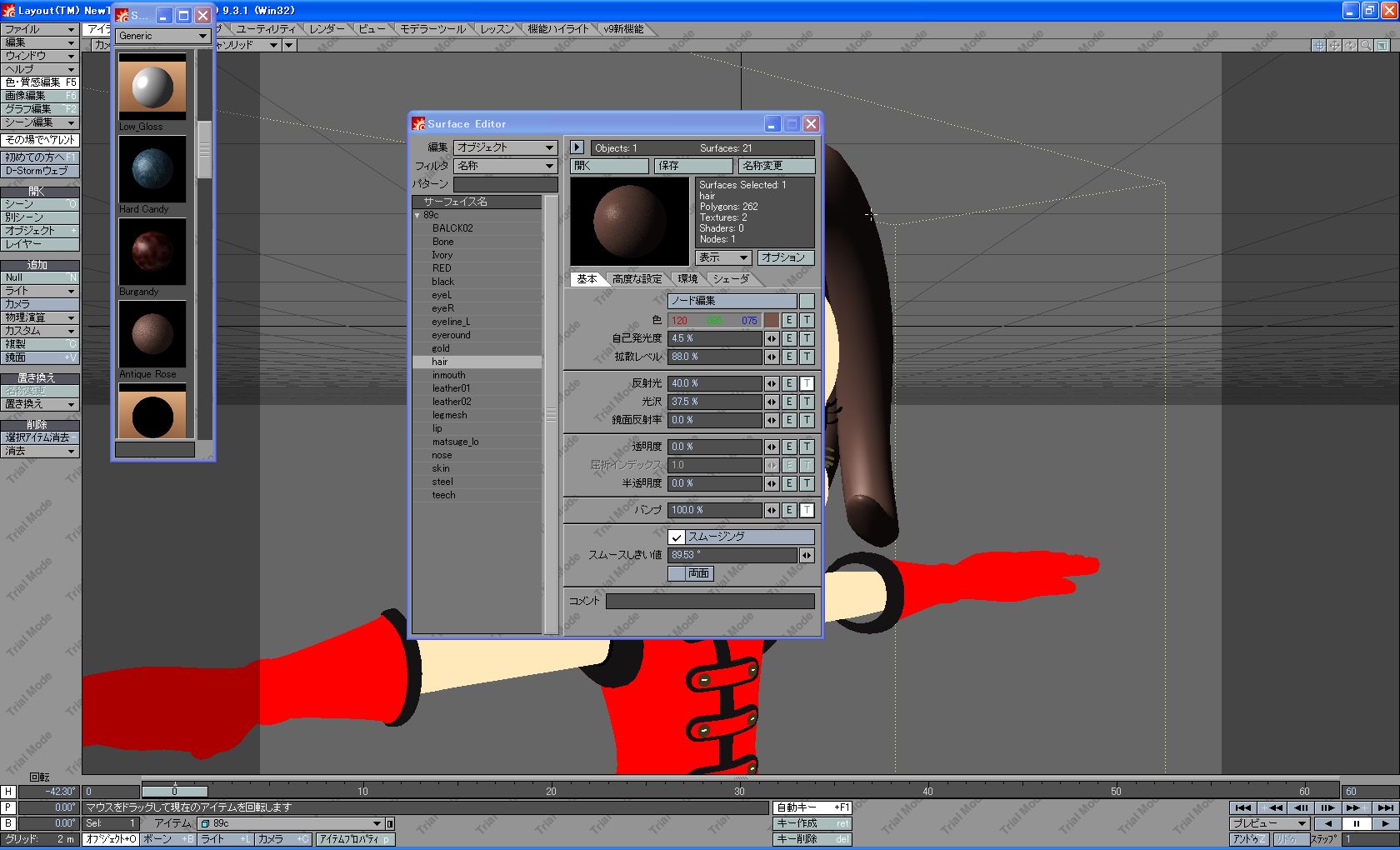
      <![CDATA[ＬＷの既存質感設定を読み込んだり、<br />
作った質感などを登録しておくプリセットの呼び出し方。<br />
<br />
質感設定をクリックして、サーフェイスエディターを呼び出してから、<br />
ターゲットのサーフェイスを選び、<br />
そのままウインドウのプリセットをクリックする。<br />
<br />
<img style="width: 496px; height: 420px" alt="" src="//samocg.blog.shinobi.jp/File/WS000012.JPG" /><br />
<br />]]> 
    </content>
    <author>
            <name>No Name Ninja</name>
        </author>
  </entry>
</feed>